Valve Reveals Requirements for Steam Frame Game Certification

2

Valve has finally revealed a few key requirements games should aim for if they plan on running on the upcoming Steam Frame headset—at least if they want the coveted ‘Steam Frame Verified’ badge.

The News

In Valve’s ‘Steam Hardware’ talk at this year’s Game Developers Conference (GDC), the company showed off two specific stats that games should hit in standalone mode, noting that games will be tested in order to achieve the Steam Frame Verified badge.

For games running natively on the headset, Valve says VR games need to hit a minimum of 90 fps, which is notably higher than Frame’s minimum variable 72Hz refresh rate. Information was provided by XR analyst Brad Lynch.

Image courtesy Valve

Steam Frame can also download and natively play non-VR content too, although performance minimums are much more lax here, requiring a minimum of 30 fps at a resolution of 1,280 x 720.

For contrast, on the Horizon Store VR games must hit at very least 72 fps to match Quest’s minimum 72Hz refresh, while general media can hit a minimum of 60 fps.

Additionally, Valve says games must offer a “legible UI” in addition to full playability with Steam Frame controllers.
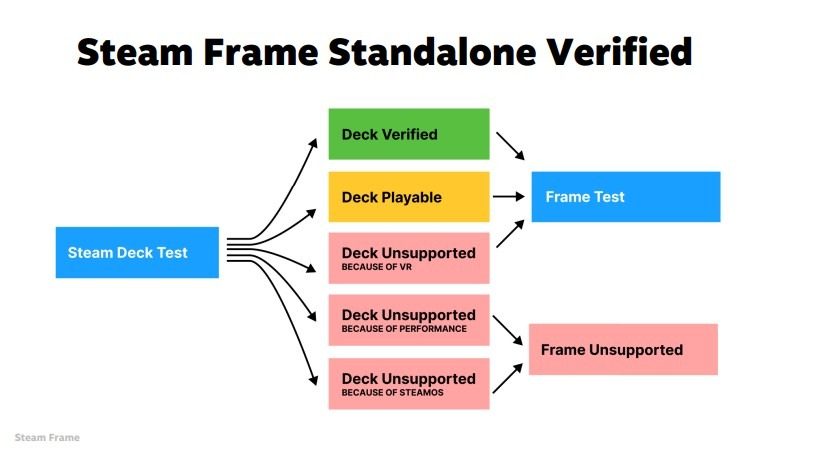
Image courtesy Valve

The company says games that are ‘Verified’ or ‘Playable’ on Steam Deck are automatically tested for the Frame Verified badge, as seen in the flow chart above. Games that aren’t supported on Deck due to performance or lack of compatibility with SteamOS won’t be considered.

As for PC VR gameplay, Frame’s direct WiFi 6 connection and Foveated Streaming protocol are said to run without requiring any sort of test or verification program.

“If it runs well on your host PC, it will run well on Steam Frame,” Valve says, noting that streaming requires no special integration, VR titles included. You can check out the slides for Valve’s Steam Hardware presentation here.

SEE ALSO
Meta's Language Learning App for Quest Combines Mixed Reality and AI

My Take

The jump from 72 fps to 90 fps may not sound like a lot, but it represents a roughly 25% increase in rendering workload, meaning developers hoping to directly port their games from Quest may need to optimize a fair bit to maintain Frame’s higher target.

Quest 3 and Steam Frame aren’t 1:1 when it comes to specs, but they do seem to be broadly comparable in native rendering capabilities. On day one (who knows when that will be), I’d imagine we’ll see a lot more non-VR games claim the Frame Certified than native VR games, as devs will need to either optimize existing SteamVR titles for standalone mode or otherwise port (and likely optimize) Quest games for Frame.

That said, like on Steam Deck, Valve isn’t stopping you from downloading and playing anything on Steam—it’s just providing guidelines to make sure consumers known when games fully work or not.

Whatever the case, Valve still has us in a holding pattern, as the global RAM and storage shortage seems to have wrinkled the company’s release plans for Steam Frame, Steam Machine, and Steam Controller.

Looking for more Steam Frame news?

Valve Unveils Steam Frame VR headset to Make Your Entire Steam Library Portable: Valve shows off Steam Frame, the standalone headset that can stream and natively play your entire Steam library—with only a few caveats right now.

Hands-on: Steam Frame Reveals Valve’s Modern Vision for VR and Growing Hardware Ambitions: We go hands-on with Valve’s latest and greatest VR headset yet.

Valve Says No New First-party VR Game is in Development: Valve launched Half-Life: Alyx (2020) a few months after releasing Index, but no such luck for first-party content on Steam Frame.

Valve is Open to Bringing SteamOS to Third-party VR Headsets: Steam Frame is the first VR headset to run SteamOS, but it may not be the last.

Valve Plans to Offer Steam Frame Dev Kits to VR Developers: Steam Frame isn’t here yet; Valve says it needs more time with developers first so they can optimize their PC VR games.

Valve Announces SteamOS Console and New Steam Controller, Designed with Steam Frame Headset in Mind: Find out why Valve’s new SteamOS-running Console and controller will work seamlessly with Steam Frame.

Steam Frame vs. Quest 3 Specs: Better Streaming, Power & Hackability: Quest 3 can do a lot, but can it go toe-to-toe with Steam Frame?

Steam Frame vs. Valve Index Specs: Wireless VR Gameplay That’s Generations Ahead : Valve Index used to be the go-to PC VR headset, but the times have changed.

This article may contain affiliate links. If you click an affiliate link and buy a product we may receive a small commission which helps support the publication. See here for more information.

Well before the first modern XR products hit the market, Scott recognized the potential of the technology and set out to understand and document its growth. He has been professionally reporting on the space for nearly a decade as Editor at Road to VR, authoring more than 4,000 articles on the topic. Scott brings that seasoned insight to his reporting from major industry events across the globe.
  • xyzs

    It will force dev to optimize further, that’s good practice.

    Maybe the os can apply driver level dynamic foveated rendering since it has the eye tracking unlike quest 3, allowing these few extra fps target.
    Also, the overhead of steamos of might be less than horizon.

  • Christian Schildwaechter

    TL;DR: The Steam Deck/Frame verified program is a "works without issues" label, not a requirement; the SoC in Frame is way faster than Quest 3, which should easily cover any higher requirements to be verified.

    It's important to note that "Steam Deck/Frame Verified" is just a recommendation system, not a minimal spec definition. It basically says that the game will be playable without larger hitches. The "Steam Deck/Frame Playable" means that there are at least inconveniences, though esp. on the Deck these are often input or display related, for example very small text. The slides list 25K+ games as Steam Deck playable or verified, but that doesn't mean that the other ~65K games on Steam won't work, they've mostly just never/not yet been tested.

    And Steam Deck users play a lot of neither verified nor officially playable games. Given that people streamed HL:A from a Steam Deck (at low settings with reprojection), they will no doubt try running it on Frame day one. Maybe we are lucky and Valve adds foveated rendering to HL:A before Frame launches, as otherwise it would most certainly not get the verified label, not even playable for some of the later, more compute heavy chapters. You'll still be able to play it locally, or at least try, it's just not recommended.

    The jump from 72 fps to 90 fps may not sound like a lot, but it represents a roughly 25% increase in rendering workload, meaning developers hoping to directly port their games from Quest may need to optimize a fair bit to maintain Frame’s higher target.

    That's unlikely for a number of reasons. For one Frame will support all Meta-specific OpenXR extensions for eye tracking, so all games can benefit from ETFR performance gains thanks to Frame's built-in eye tracking. And while these gains were only ~25% or less on Quest Pro, and often not worth the resulting battery drain, this alone should provide enough extra render power for pushing games from 72Hz to 90Hz.

    The SD8 Gen 3 in Frame is also significantly faster than the XR2 Gen 2 in Quest 3, and much much faster than the XR2+ Gen 1 in Quest Pro that was still too CPU limited for efficient ETFR. That's partly because the XR2 are optimized for constant loads, with lower clocked CPU cores. The Quest 3 uses 2/3 performance/efficiency cores (AFAIR, might be 3/2) running at a max frequency of 2.05GHz, and clocking as low as 1.4GHz in graphics heavy apps like games, according to slides Meta showed during the Quest 3 introduction. The SD8 Gen 3 uses 5/2 of the same cores from a newer generation, but running at 3.15GHz/2.3GHz, and comes with an extra high performance core running at up to 3.3GHz. The SD8 Gen 3 also uses an Adreno 750 GPU, which according to Qualcomm provides an up to 25% performance boost over the Adreno 740 used in Quest 3, as well as being 25% more power efficient.

    So even without the performance from CPU heavy ETFR (and other expected tricks like FSR upscaling), the Frame should have no problems to run any Quest game at much higher refresh rates. The lower clocks on the XR2 are there for a reason though, as a regular phone SoC like the SD8 Gen 3 is optimized for short performance burst, which can lead to a lot of thermal throttling in VR. Valve said they are building a giant database based on tons of thermal measurements that picks optimized core settings and frequencies on a per game-basis. So a shooter with constant high load may run only on performance cores, a casual game only on efficiency cores to preserve battery life, while a turn based game with short compute spikes might use the faster high performance core for these.

    How well this works out in reality remains to be seen, the performance benefit over Quest 3 will not be as impressive as the core/frequency numbers alone suggest. But it is fair to say that Frame should be able to handle any APK that runs on Quest 3 or even a faster GXR or Play for Dream due to the improved SoC. The 90Hz demand for standalone VR games to get Steam Frame Verified is more of an issue for PCVR games running locally on Frame.