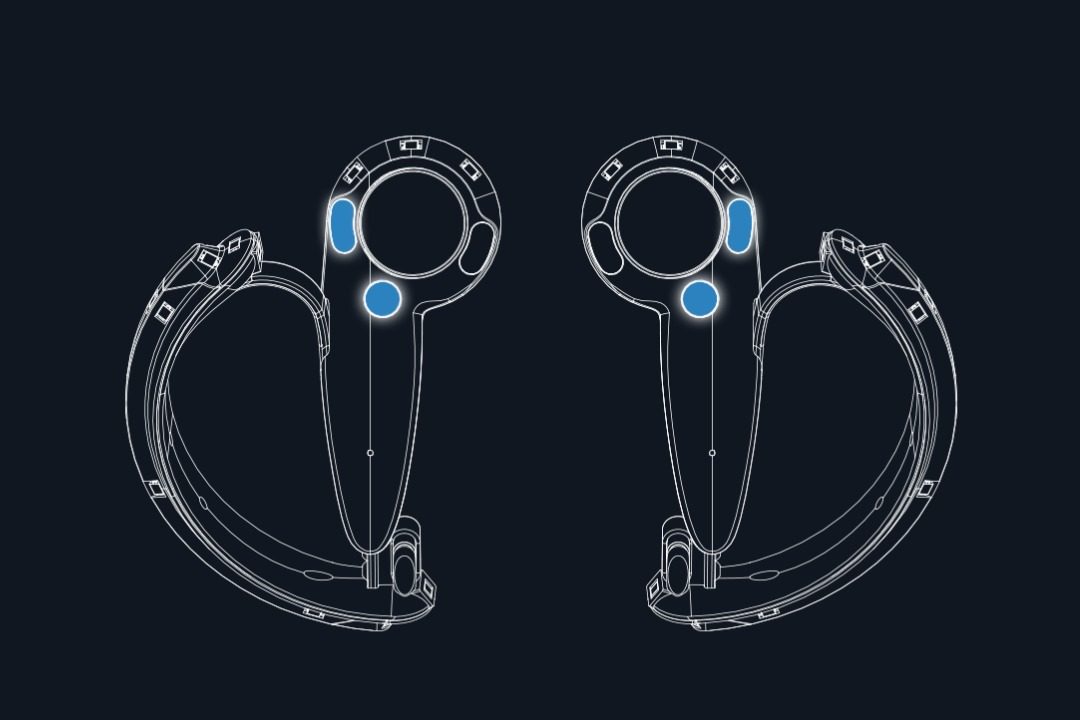
Valve has lifted the veil somewhat on its Knuckles controllers, first revealed as a prototype last October at the company’s annual Steam Dev Days conference. In a blog post today, Valve showed off some specs of the Knuckles dev kit alongside a button-map of the device, revealing the controllers will have multiple capacitive sensors to allow for some basic 5-finger tracking.

Like HTC Vive’s motion controller, Knuckles is positioned in 3D space by Steams’s Lighthouse tracking system, but Valve has designed its prototype motion controller to offer a greater sense of presence than its ‘closed hand’ predecessor. By creating a device that clamps onto the back of your hand, Valve hopes to let users ‘let go’ of the controller while in use, allowing virtual objects to be grabbed and thrown naturally.

As an ‘open hand’ controller, Knuckles will also hone in on virtual hand presence by including a number of capacitive sensors, detailed today in a developer blog post. Located in different areas on the controller, these sensors, much like the ones in Ouclus Touch, will help detect the state of the user’s hands by sensing when your finger in on a button, or particular part of a controller.

Capacitive sensors are under each physical button including the trigger surface, outer face button surface, inner face button surface, and system button surface. There are also separate arrays of capacitive sensors in the controller’s grip, which is designed to enable grasp and un-grasp actions and determine which finger is resting where.

SEE ALSO
Valve VR Frontman Chet Faliszek Departs Company After 12 Years

While this isn’t what you’d call ‘full’ finger tracking, which would ideally involve a way to calculate exactly where your fingers are at all times, the Knuckles controller is promising to provide a more basic tracking solution that can tell if your fingers are resting on discrete parts of the controller, like sitting on a button or curling around the grip. To keep the finger motions from looking “too mechanical,” Valve recommends devs perform some smoothing when rendering virtual hands for the controller.

It’s not ideal, but besides aiming to provide better hand presence, it also hopes to make social VR a little more human by allowing users to show natural hand positions.
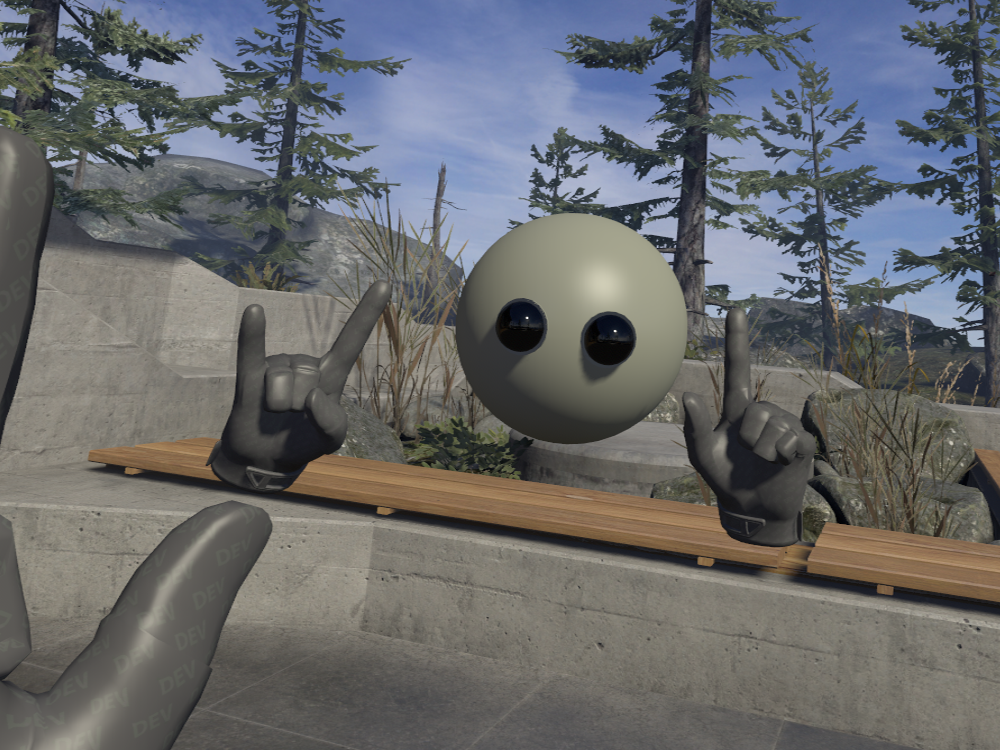
image courtesy Valve

It also has a handy strap-tightening system that lets you fit the controller snug, and release with a single hand.

Some is sure to change before commercial release of the Knuckles controllers. Developers currently need to calibrate finger tracking, as dev units provide “very poor” tracking when operated in an uncalibrated state. Valve says however the need for an explicit calibration procedure “should be considered a temporary measure that will only be required for these dev-units.” Dev kits currently have a 3 hour battery life that draw current from a rechargeable 500mA battery, charging via a USB micro-B connector.

This article may contain affiliate links. If you click an affiliate link and buy a product we may receive a small commission which helps support the publication. See here for more information.


64 COMMENTS

    • It can detect when your finger is curled around the grip, yes. That fits into “on or off,” however. Valve says:

      “Each finger axis returns a curl value between. *zero and one*, where zero indicates that the finger is pointing straight out and one indicates that the finger is fully curled around the controller. For rendering finger motions to the user, it is recommended to perform some smoothing to keep the finger motions from looking too mechanical.”

      I have updated for clarity.

    • It would be interesting to know whether the Cap-Touch controller chip they use includes the proximity function (some do). I imagine some clever shaping of the sensor pad could help improve the curl linearity.
      Also note the “curl” value is being reported as an axis, if it’s like the trigger axis (on the Watchman controller) this will also be mapped onto the button bit-field.

    • it gets easier with a bit of practice, you have to get over the fear of throwing the controllers themselves and just sort of relax with them and let your brain fill in the action and a sense of weight.

    • It actually depends on the game and the way each developer has implemented the controls. With some games when you throw something it seems to stick to your hand and often goes off in the wrong direction when it is thrown, and with other games it’s much more responsive and always seems to go basically where you expect it too. Rick and Morty: Virtual Rick-ality is a good example of a game where throwing stuff just feels good (responsive and accurate).

    • Since when? I once was doing some development testing with the Vive, and started getting frustrated that the controller would intermittently start acting funny when I was facing certain directions. It turns out that one of my Lighthouses had gotten unplugged, and I was only noticing a problem when my body blocked the controller from seeing the sole remaining Lighthouse. If I hadn’t had a reason to face directly away from the Lighthouse that was still plugged in, I wouldn’t have realized there was a problem. The IMUs in the controller worked well enough that I was fooled into thinking I still had (somewhat buggy) 360-degree coverage.

      • that only works for fast motions like shooting games

        try slow slow motion precise positioning (typing ?) with IMU only

        and there is a good reason they have 2 lighthouses besides occlusion

        • Well, of course IMUs wouldn’t work for extended precision movement by themselves, otherwise there would never have been a need for the tracking systems implemented by Oculus and HTC/Valve.

          Anyway, the development testing I was doing was for testing a walking locomotion system I’ve been developing. There were no fast movements involved, and no actual gameplay. Just testing walking around in a virtual environment. The controller wasn’t being moved any faster than your arms move when walking. With just one Lighthouse running I was still able to get reliable tracking in more than a 270-degree arc. Even with intermittent occlusion the IMUs were doing their job well enough that the occlusion wasn’t reliably causing tracking to fail.

          Yes, there are reasons other than occlusion avoidance for running multiple Lighthouses, but the controllers aren’t going to suddenly have major tracking problems just because they can only see one Lighthouse. The controllers have to be able to work well with just one Lighthouse, otherwise two Lighthouses wouldn’t be enough for proper coverage.

          • wrong

            tracking with 1 lighthouse is extremely anisotropic with large jitter in z direction – several cm not mm
            especially for small controller at larger distance

            google alan yates’ (creator of lighthouse) talk on hackaday

          • You’re clearly trying to crap on a device and ignoring that a large portion of the visitors to this board HAVE a Vive, and tracking is spot-on, even with only one lighthouse.

            Is this a new “Vive sucks, Oculus rules!” tactic?

            It looks like a neat controller, if it tracked terribly they’d have already put the big ring back on top.

          • i agreed, the tracking is very robust. in my domestic universe of 4.1M x 2.5M I could stick my head (wearing the HMD) out of my window – why not?

            The screen would grey out as tracking was lost, pull my head back inside and tracking instantly re-established. Plenty of random movement and crouching down, jumping about, dancing,
            watch someone really flying in Blueshift!! and controllers being tipped/rotated in Tiltbrush, all very solid, cannot report tracking issues.

            Taking it out of domestic into “room scale plus” showed how effective it actually was in terms of reliability during extended play sessions, and controller / HMD accuracy

          • you still don’t get it

            yes, tracking is robust but with just one basestation the error in z durection grows as a square of distance while x and y position erros grow linearly
            it’s all masked by IMUs of course
            slow motion precise positioning at 5 m – try that out

          • I listened to the presentation twice and didn’t hear him say anything about specific numbers regarding jitter. Do you have a timestamp for the presentation I can reference?

            As for independent testing of the tracking accuracy, Oliver Kreylos (a VR researcher who RoadToVR has reported on before) did tracking experiments with Lighthouse, and had this to say about jitter when using just one Lighthouse:

            “With only a single base station, the noise distribution turns highly anisotropic, with 0.3mm laterally to the remaining base station, and 2.1mm in the distance direction.”

            2.1mm is a far cry from your claim of several cm. Granted, his setup had the controller sitting stationary in the middle of his play space where the Lighthouses are ordinarily 4 meters apart. This puts his controller at a little more than 2 meters way (taking into account the upward angle to the Lighthouse). So if we’re assume that every doubling of distance quadruples the inaccuracy, then at 4 meters he should be seeing 1.2mm inaccuracy laterally, and 8.4mm in the distance direction. Those numbers are still under 1cm each. That 8.4mm number is quite interesting, because I have a somewhat larger tracking area than Oliver Kreylos does, with a distance between Lighthouses at about 5.4 meters. Doing my own experiment, I was able to get similar results. I’ll post the experiment as a separate reply.

          • Rather than replicate Oliver’s setup, I decided to place place both of my controllers less than 1 meter away from one of my Lighthouses, which put the controllers nearly 5 meters away from the farther Lighthouse (more than 5 meters when accounting for the height difference). I wanted to compare dual-Lighthouse tracking versus single-Lighthouse tracking at the same time, so I took a folding chair and positioned it above one controller so that both controllers could see the farther Lighthouse, but only one controller could see the closer Lighthouse which was more-or-less overhead.

            During setup, the controllers were powered off. I wanted to ensure that the IMU could not contribute any information regarding the initial placement of the controllers. With setup complete, I powered on the controllers. I found that in terms of accuracy, the controller was about 1cm out of position relative to the other controller. (I had them touching head-to-head to make positioning errors easier to see and quantify.) In terms of precision, the jitter was visible, but mild. It was definitely under 5mm, and closer to about 2-3mm. Several times I blocked the controller from the view of the other Lighthouse until it drifted, then vanished from view in VR, then allowed it to again see a single Lighthouse. Every time, with just one Lighthouse for reference, the controller was able to return to the same position in VR.

            What I find particularly interesting about this experiment is that it was something of a worst-case scenario. The controller was pointing sideways relative to the Lighthouse, so many of the sensors were obscured from view. Also, the diagonal leg of the chair was very close to the controller and had glossy paint, which could have introduced some errors cause by reflected laser light. Even then, accuracy was good enough that without the other controller in close proximity, it would have been difficult to recognize the offset. It would be interesting to repeat the experiment with a non-glossy barrier, and with the controller aimed toward the Lighthouse.

            Based on the jitter, two Lighthouses is definitely better than one, but even a single Lighthouse at 5 meters produces tracking results no worse than a PSVR Move controller at much closer range.

          • Thanks for posting your results, dude

            btw PSVR has a notoriously bad tracking

            still, the error in z direction grows as a square of distance while error in x and y direction grows only linearly.
            I am not sure at what distance this becomes really noticeable when you try to do something like precise drawing in 3D
            But I assume at 5 m you keep about 1 or 2 mm precision with 2 lighthouses and with just one lighthouse the precision in z-direction will be (much?) worse than 1 cm
            1 cm precision is not adequate for precise positioning in VR productivity app like 3D drawing
            But I do agree that Lighthouse tracking is much superior to both Rifts (multiple) cameras and PSVR

  1. JUST the auto-tightening strap makes this a clear win. Change the Vive 1 bundles to include these instead of the wands ASAP, or make them standard with Vive 2 at a minimum. This also means most early adopters will have a second set of controllers to use as tracked objects if they like for mixed-reality, local asymmetric multiplayer or for tracking objects. We need way, way more 3d-printable and bootstrapped vive-wand mounting accessories. Think keyboards, controllers, chairs, shoes, etc.

      • Not sure why, man. Vive wands are fated to the same realm of historical curiosity as the original XBox “Duke” controller. Obscenely huge and awkward. Just wait until the strap-controller software starts dropping, you’ll know why you won’t wanna go back.

        • i know, the functionality is great but im talking about the feel, depending on what their weight is, because i like the wands compared to touch in some cases, like for holding weapons, swords, guns and the like, but the knuckles controllers seem small, light and wont be as nice in those situations, but of course well find out when they are released. :) dont get me wrong im still looking forward to them and will use them, i can just see myself still using the wands especially for sword wielding games.

          • what about swords (or any kind of melee weapon, weight in a weapon really helps)? didnt see anything on that, but either way its gonna depend on when people actually get their hand on them, if they have got the weight distribution and ergonomics done really well that they fit any kind of item then great (though i dont see how thats possible), im hoping thats the case. :)